A learning platform designed for higher education. CampusFrame brings course management and AI tutoring together in a single environment. Every course has its own AI tutor, under the instructor’s control. The platform is hosted in Europe.

Overview

CampusFrame provides the standard features of a learning management system: degree programmes and courses, teaching materials, schedules, learning activities, assessments and messaging. Each course also has an AI tutor whose pedagogical approach is determined by the instructor. Students work across their courses in one environment, while instructors and programme directors have tools to monitor learning and identify areas of difficulty.

The AI tutor draws directly on the materials instructors already provide: lecture slides and other course resources, syllabuses, past examinations and assessment criteria. CampusFrame indexes these materials by course and class session, allowing the AI tutor to respond in the context of what has actually been taught and what students are expected to learn. Instructors do not need to write separate instructions for the AI.

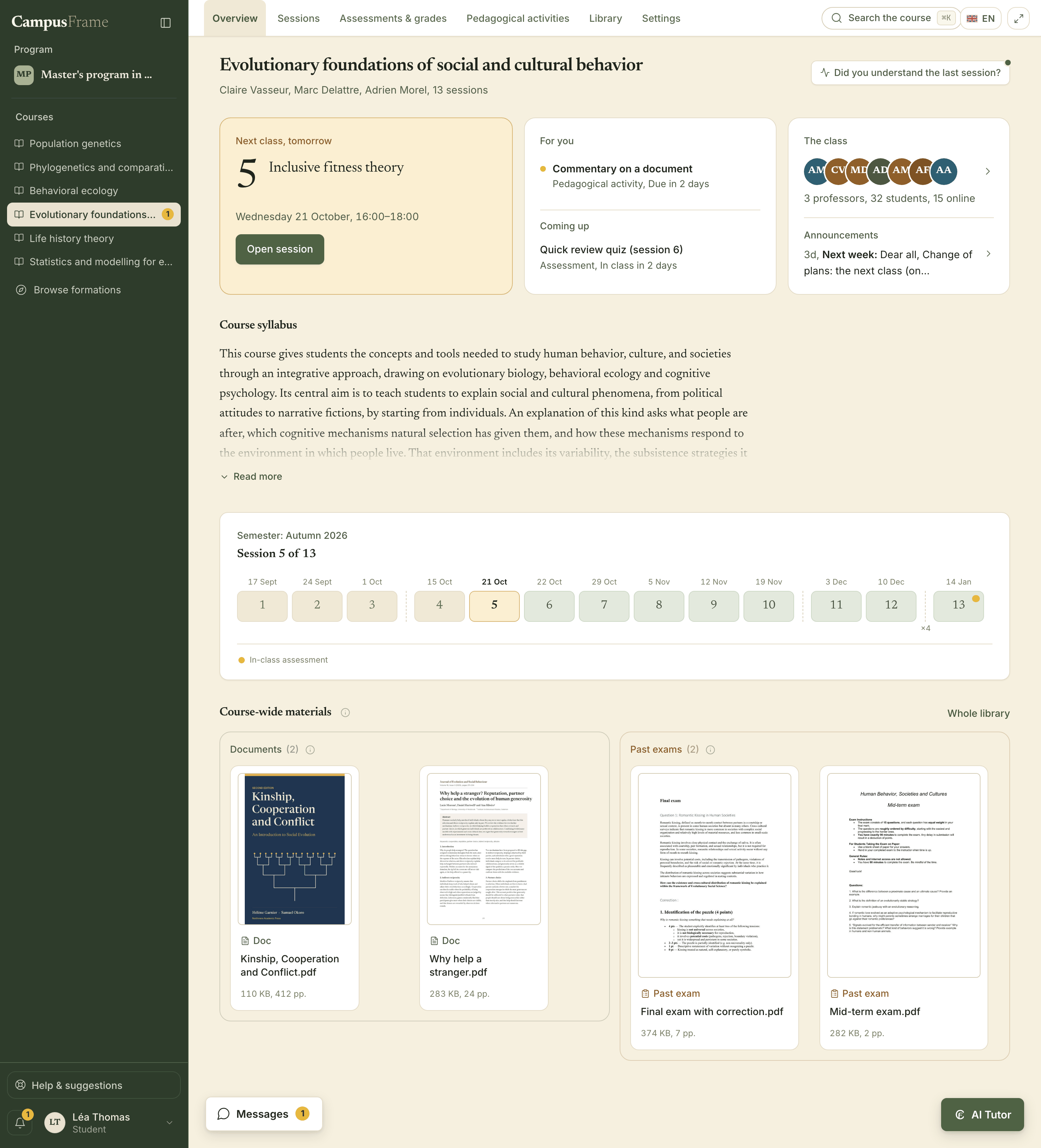
Student view of a CampusFrame course, showing the next class, assigned activities, class announcements, syllabus, semester schedule, documents and past examinations. The AI tutor appears at the bottom right, with other courses in the sidebar.
Course overview showing the next class, upcoming work, announcements, syllabus, semester schedule and course resources. The AI tutor is available in the bottom-right corner.

Who it is for

For students, instructors and programme directors.

CampusFrame was developed by a cognitive scientist who also directs a degree programme at a leading higher education institution. Its design reflects firsthand experience of university teaching, academic administration and the needs of students and faculty.

For students

Courses and AI tutoring in one place.

Students can access their schedules, course materials, activities and assessments through a single interface. Every course includes an AI tutor available at any time. Its answers are grounded in the course materials, with direct references to the relevant pages, passages or slides. The AI tutor takes previous conversations into account, revisits concepts students have struggled with and distinguishes material already covered in class from topics still to come.
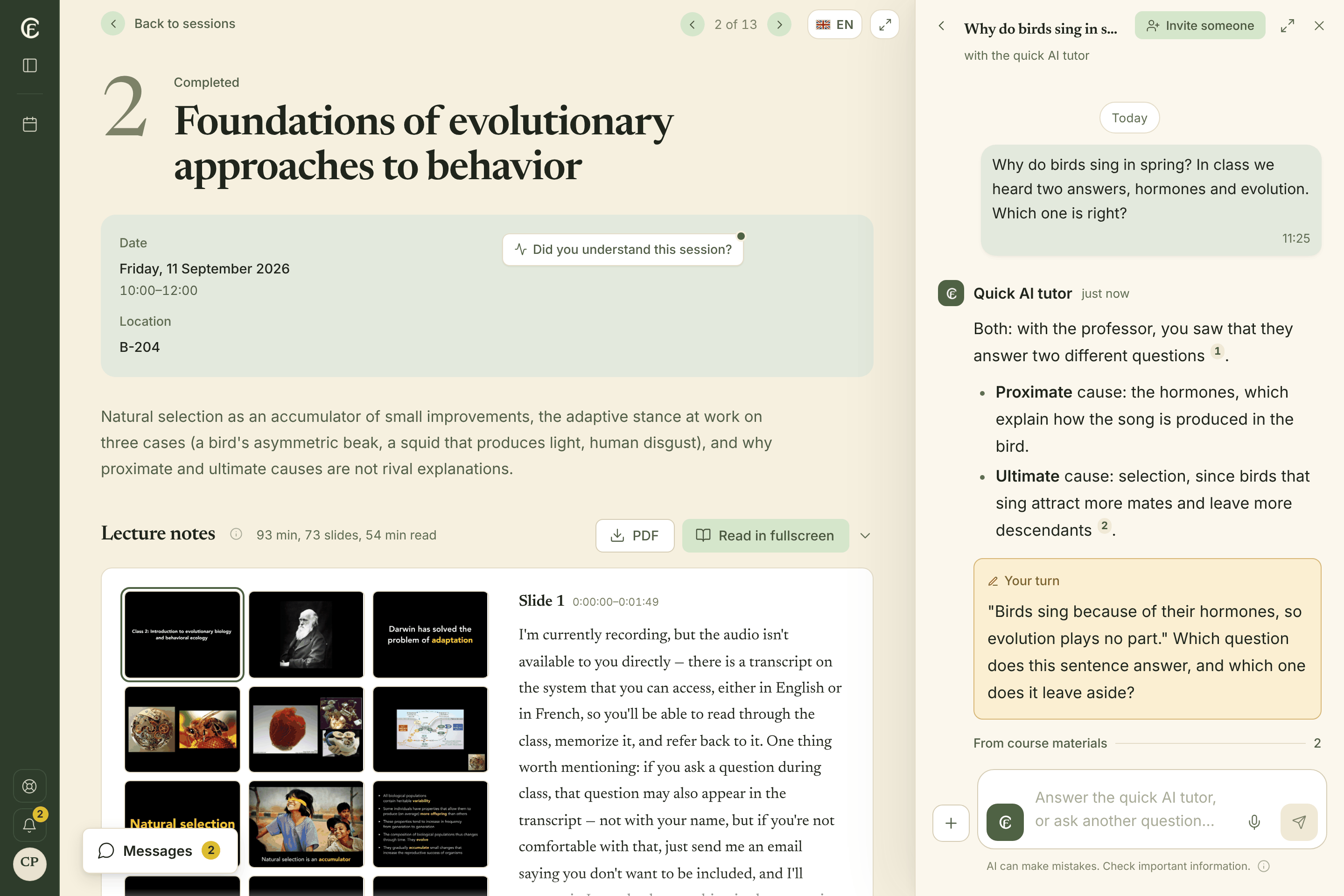
Class session page showing the date, location, materials and a slide-by-slide account of the session. On the right, the AI tutor answers a question, cites its sources and asks a follow-up question to check understanding.

For instructors

Instructors control how the AI tutor teaches.

Instructors prepare their courses and upload materials much as they would in any learning management system. The AI tutor uses these resources as soon as they become available, drawing on the syllabus and assessment criteria to understand the course’s expectations. Instructors can give it additional directions, but they do not have to. They can also test its responses, either by asking questions themselves or by simulating a student’s interaction.

Reports based on anonymised summaries of students’ exchanges with the AI tutor show which concepts appear well understood, where difficulties persist, which questions arise most often and how students respond to the course materials.

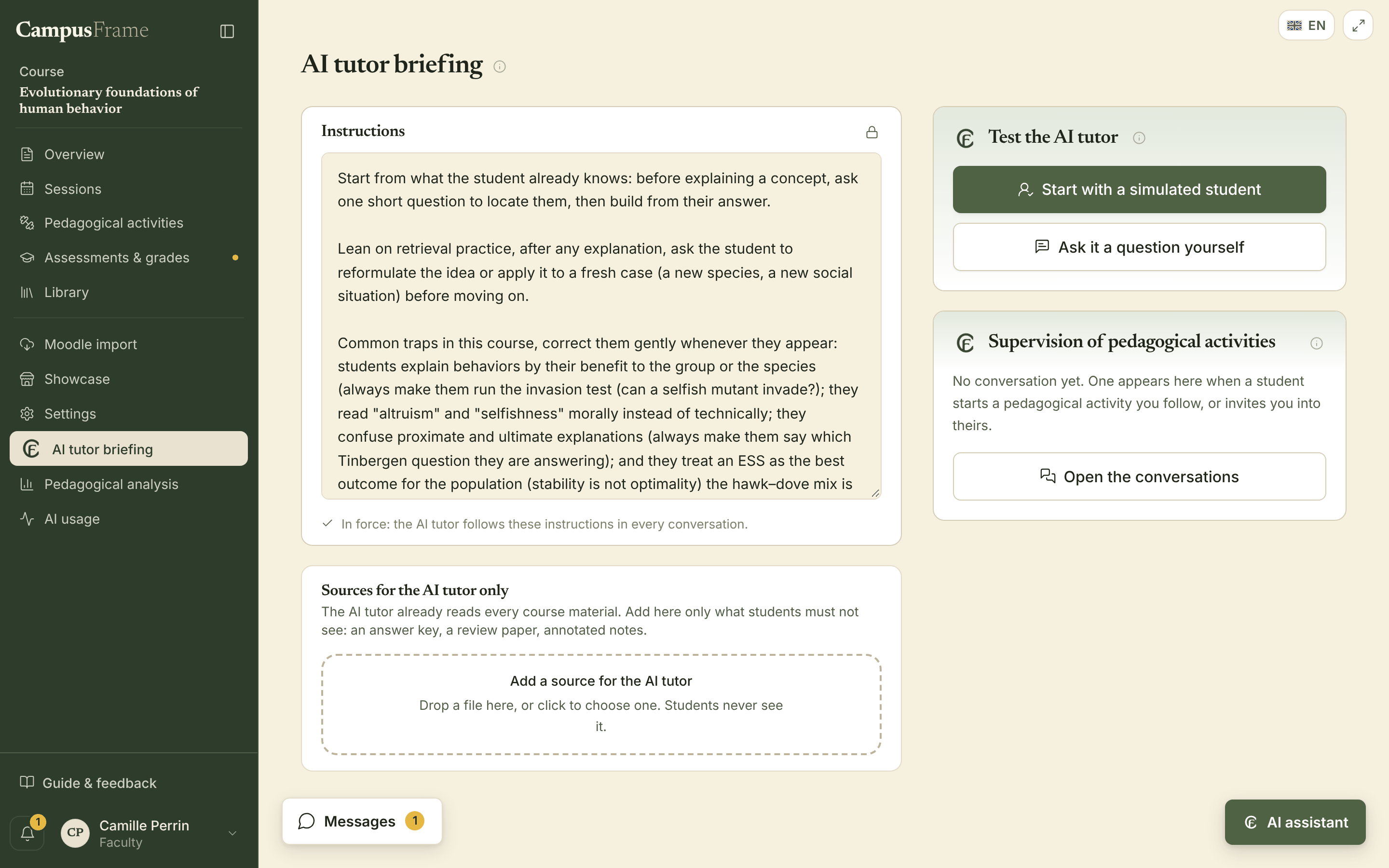
AI tutor settings in the instructor’s course view, showing pedagogical instructions, testing tools and access to learning activity monitoring.

For programme directors

Understanding teaching across the programme.

Course-level learning reports give programme directors a further source of evidence about how the curriculum is working. They can help directors:

  • establish which prerequisites individual courses actually require;
  • identify recurring difficulties across the student cohort;
  • improve the sequence and coordination of courses;
  • find gaps and unnecessary overlap in the curriculum;
  • advise students on pathways and elective choices.

Programme directors also have a shared calendar covering all courses and access to end-of-semester course survey results. CampusFrame can generate a programme website and keep its course catalogue up to date automatically.

Features

Everything needed to run a course.

CampusFrame includes the tools instructors need to manage teaching, organise student work and assess learning.

Class sessions and materials

Each class session has a place in the course schedule, with its description, slides, documents, links and videos. Files can be added by dragging and dropping them into the course. General resources can be organised into folders, and existing Moodle course content can be imported in a single operation.

Learning activities

Activities can include revision exercises, assessment preparation, guided tasks, group discussions or readings followed by written assignments. They can be individual or collaborative, completed in class or independently, with or without the AI tutor. Instructors can monitor participation and group work, and schedule activities for the semester in advance.

Assessments and grades

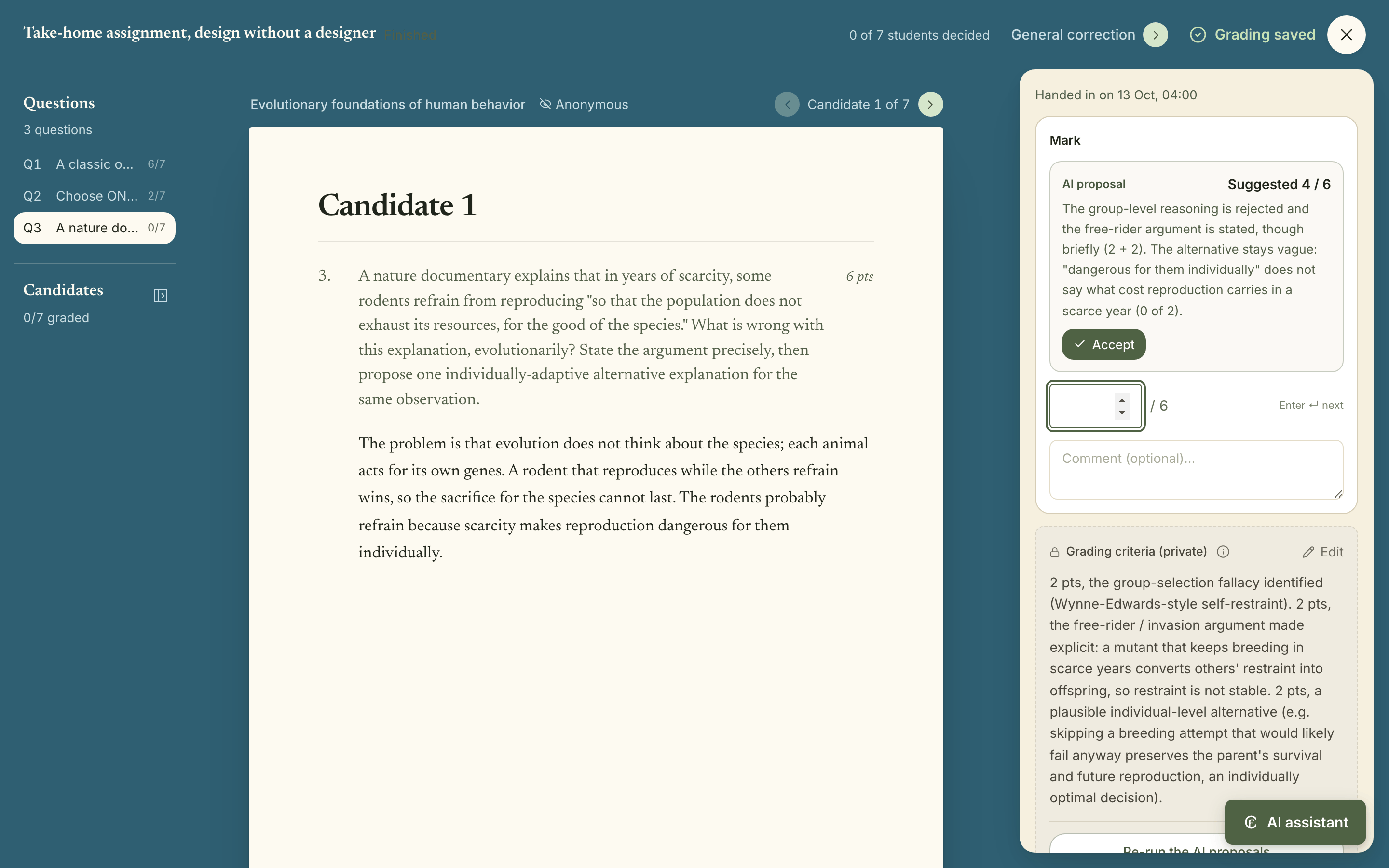
Assessments can use multiple-choice or open-ended questions, file submissions or paper scripts. For in-class assessments, an exam mode and a code provided verbally by the instructor help control access. Scripts remain anonymous during marking. For assessments completed on CampusFrame, AI can suggest a grade and explain it with reference to the marking scheme and assessment criteria; the instructor makes the final decision. The gradebook calculates weighted averages and displays grade distributions.

Messaging and announcements

Each course has a class discussion space, an announcements channel and direct messaging. Announcements are sent by email; users choose which other messages they wish to receive as email notifications.

Understanding how a course is received

After each class, students can report anonymously what they understood and what remains unclear. Their responses, together with anonymised summaries of their conversations with the AI tutor, contribute to a learning report that develops over the semester. An end-of-course survey provides further information. Instructors can discuss the findings privately with their AI assistant.

French and English

CampusFrame is available in French and English. Users choose the language of their interface and platform emails. Students can also read class session reports in their preferred language.

Assessment marking interface showing an anonymous list of scripts and questions, a student’s answer, an AI-suggested grade and explanation, the instructor’s marking scheme and a field for approving or changing the grade.
Student scripts remain anonymous until grades are released. AI suggests a grade with an explanation based on the marking scheme; the instructor can revise it before approval.
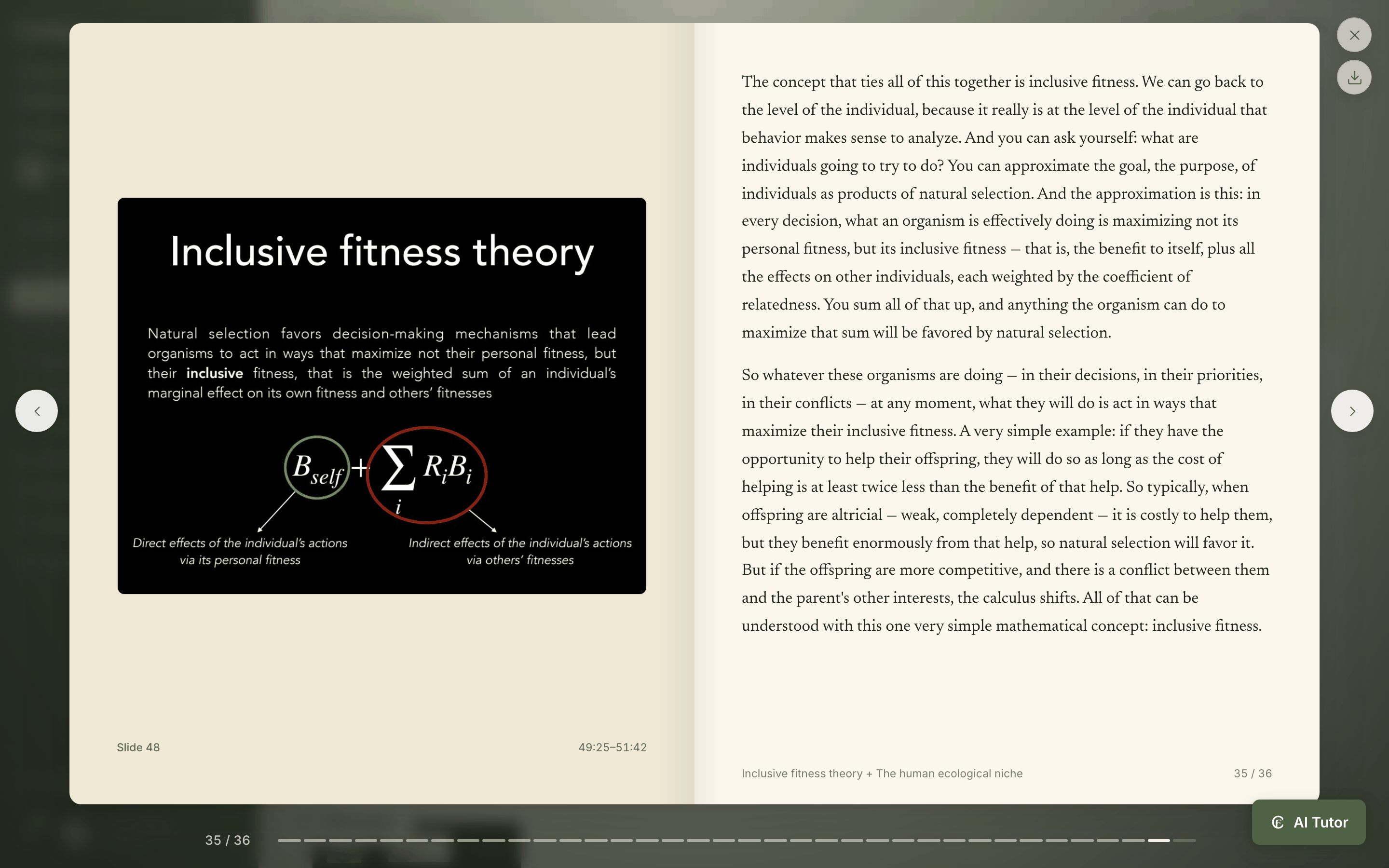
Report from a recorded class session, with a slide on the left and the corresponding text on the right.
An AI-generated report based on a recording of the class, available in the student’s chosen language. The text appears alongside the corresponding slides.

How the AI tutor works

The AI tutor knows the course and follows each student’s progress.

The AI tutor draws on three sources of information that CampusFrame brings together automatically: the course materials, the structure of the teaching and the student’s previous work. This allows it to place questions in context and adapt its guidance to each student’s progress.

What has actually been taught

Slides and other teaching materials, reports from recorded classes, syllabuses, past examinations and assessment criteria are indexed and linked to the relevant sessions. The AI tutor knows which concepts have been covered and which are still ahead. The syllabus and assessment criteria also establish the instructor’s objectives and expectations.

A map of the course’s concepts

CampusFrame builds a map of the concepts covered in a course, their relationships and their prerequisites. It links them to the relevant sessions, resources and assessments. The map is updated as the course changes, helping the AI tutor understand how a student’s difficulties relate to the wider structure of the teaching.

Each student’s previous work

Conversations with the AI tutor contribute to an individual learning model: concepts studied, difficulties encountered, topics due for revision and material taught but not yet reviewed. Instructors cannot access this model, and it is never used to assign grades. Its purpose is to help the AI tutor continue from where the student left off. Students can export or delete it along with their other data.

Guidance that adapts as students learn

The AI tutor can resume an earlier explanation, suggest revision at an appropriate time or help a student prepare for an assessment. In guided study mode, it selects activities based on the student’s previous work and areas of difficulty. Students can always choose to work on something else.

Learning reports without access to private conversations

CampusFrame provides instructors with anonymised summaries of students’ interactions with the AI tutor, but only when the class is large enough to protect individual anonymity. Private conversations are neither disclosed nor reproduced. The resulting reports identify concepts students appear to have mastered, recurring difficulties, frequently asked questions and responses to teaching materials.

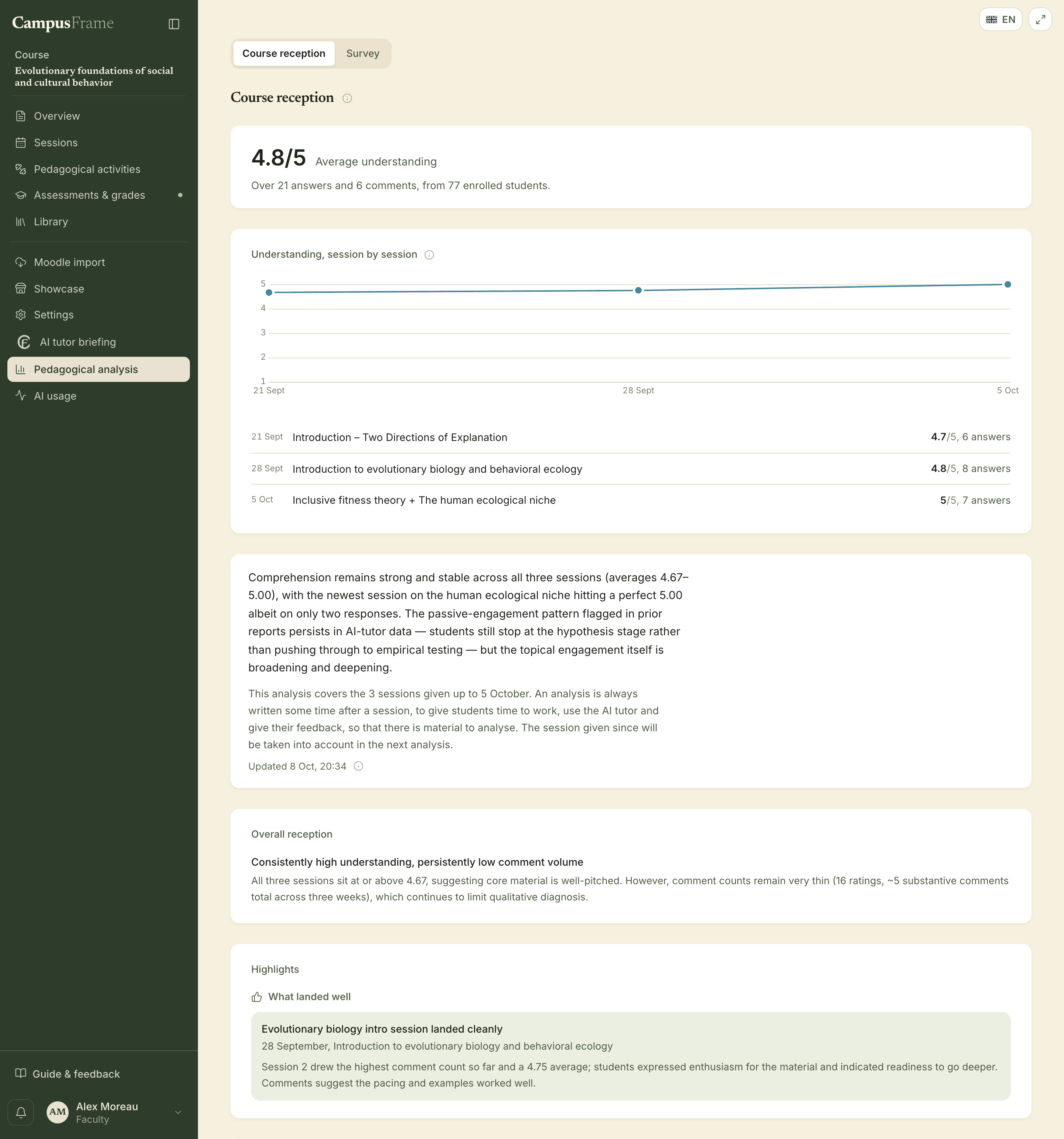
Instructor dashboard showing average self-reported understanding, changes over the semester and a summary of learning difficulties.
Learning report showing students’ self-reported understanding after each class and an analysis of difficulties drawn from anonymised interactions with the AI tutor. No individual conversations are displayed.

This requires no separate process for maintaining the AI tutor. Instructors upload and update course materials as usual; CampusFrame updates the information available to the AI. The students’ AI tutor and the instructor’s learning reports work from the same course environment.

Educational approach

AI tutoring informed by cognitive science.

Generative AI is now widely used by students, often without any framework established by their instructors. Bringing it into teaching raises an important question: how can AI support learning without taking over the intellectual work that learning requires?

Research in cognitive science points to the value of retrieving information from memory, explaining one’s reasoning, attempting a problem before seeing the solution and receiving specific feedback on mistakes. An AI system that routinely supplies answers can remove opportunities for this kind of work. Used differently, it can create more of them.

CampusFrame’s AI tutors draw on established principles of learning: explicit instruction, which introduces concepts in a structured sequence; retrieval practice, which requires students to recall information rather than simply reread it; spaced repetition, which schedules revision over time; and formative feedback, which helps students understand and correct errors. The AI tutor takes each student’s previous work into account when choosing how to apply these approaches.

Tutoring approaches

Revision, understanding and assessment practice.

By default, the standard AI tutor answers questions using the course materials and may ask a follow-up question to check understanding; its deep mode reads the materials before answering, for a fuller answer or a question that goes beyond the course. Four dedicated tools offer other ways to work: review previous classes, develop a deeper understanding of a concept, prepare for an assessment, or follow a guided study plan. In guided study, the AI tutor selects exercises and revision topics based on the student’s progress and, where relevant, the assessment criteria. Instructors can also assign these activities to the whole class.

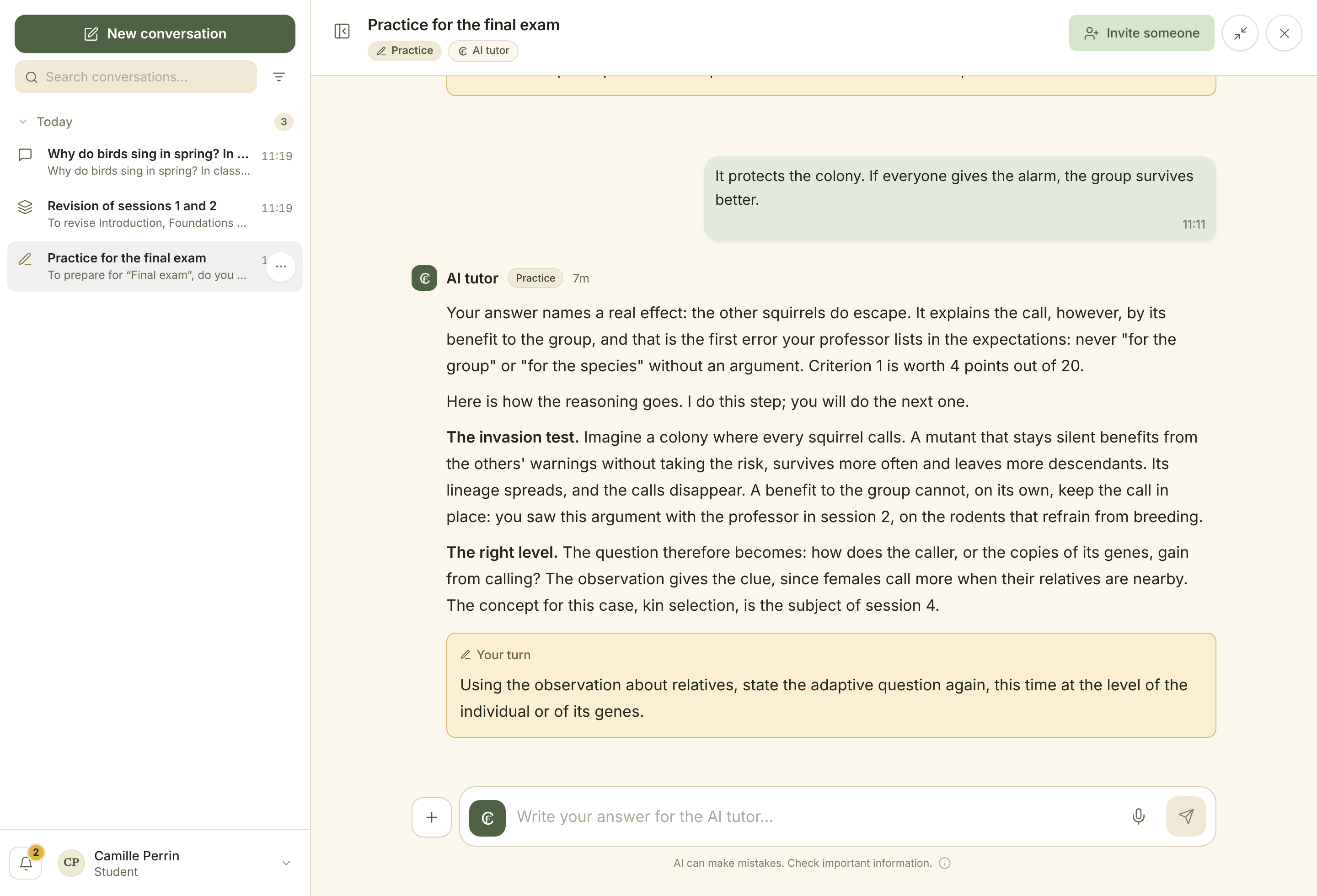
Assessment preparation provides one example. Using past examinations, the instructor’s criteria and material already taught, the AI tutor generates new questions and evaluates students’ answers against the stated expectations. When a student makes a mistake, it identifies the error, explains the relevant step in the reasoning and asks the student to continue. Practice therefore develops not only knowledge of the material but also the ability to use it.

Conversation in the assessment practice tool. A student explains an animal behaviour in terms of its benefit to the group; the AI tutor identifies the error, introduces the relevant reasoning and asks another question. Previous conversations appear in the left sidebar.
Preparing for the final examination: the AI tutor identifies an error against the assessment criteria, explains one step of the reasoning and asks the student to continue.

The instructor’s AI assistant

Course management through natural-language requests.

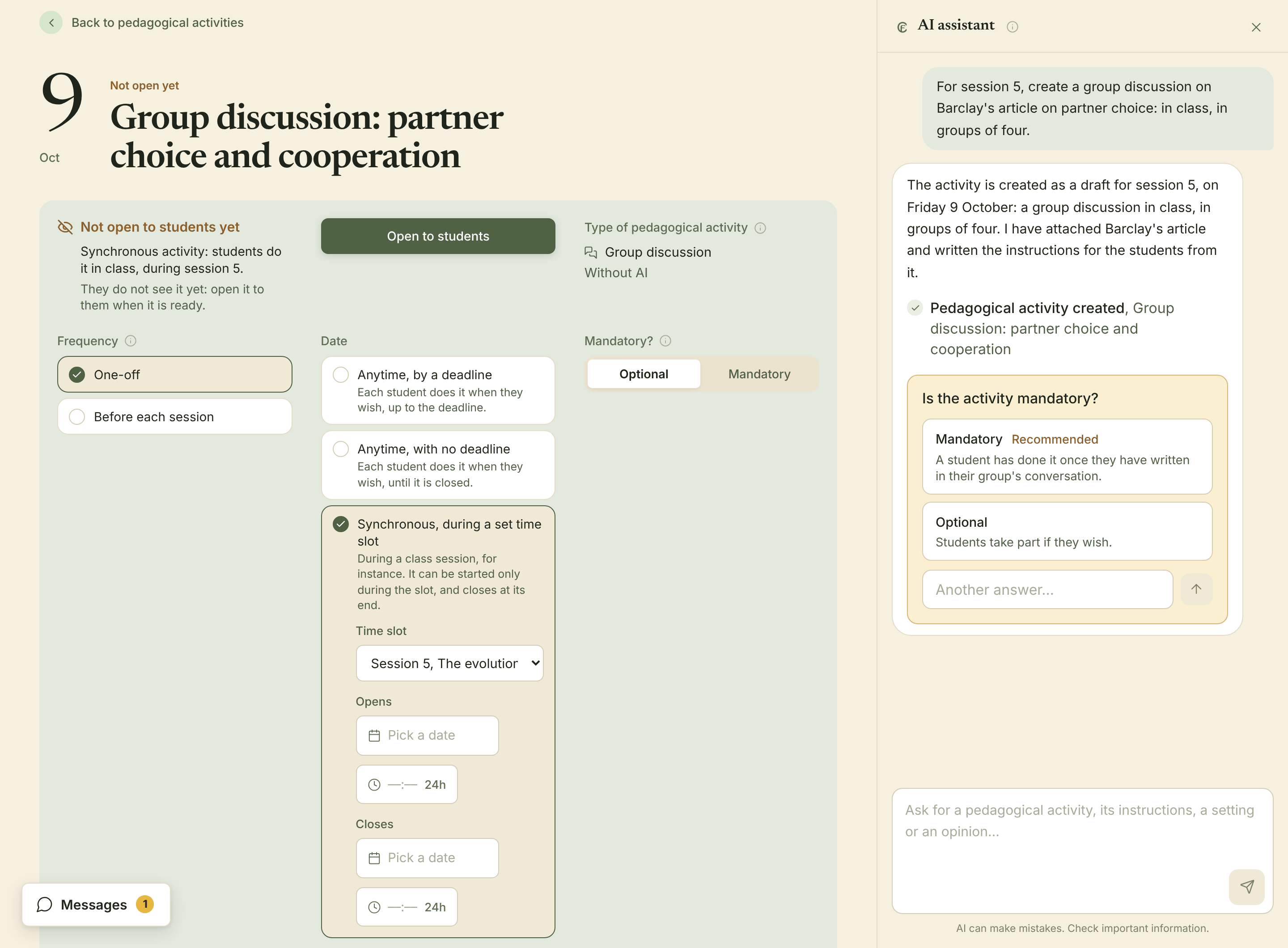
Instructors can ask an AI assistant to create an activity, prepare an assessment or change a course schedule. They describe what they want in ordinary language, without having to find the relevant settings themselves. If a detail is missing, the AI assistant asks one question at a time and suggests possible answers, while leaving the instructor free to give an answer of their own.

Learning activity editor with the AI assistant open. A discussion has been scheduled for session 5, with groups of four and an attached article; the AI assistant asks whether participation is compulsory.
The AI assistant has created a group discussion, attached the requested article and drafted the instructions in English, the language of the course. It then asks whether participation should be compulsory.

Example requests

  • “For session 4, set up an in-class group discussion of Barclay’s article, with four students per group.”
  • “The class on 12 October is cancelled. Move all subsequent sessions back by one week.”
  • “Create a five-question multiple-choice quiz for this afternoon, based on last week’s class.”
  • “Quizzes should count for 20% of the final grade.”
  • “Create a practice activity for the final examination.”

The AI assistant can draft instructions, create learning activities and assessments, change schedules, publish announcements and adjust grading weights. It has no permissions beyond those of the instructor.

When preparing a quiz or assessment, the AI assistant uses the course materials, including reports from recorded sessions, and the instructor’s assessment criteria. It flags gaps in the available information. Those same criteria can guide students’ exam preparation and, for assessments taken on CampusFrame, the AI’s proposed marking. Instructors review and approve the material and retain full responsibility for grades.

Sensitive actions (deleting content, making irreversible changes, publishing material to students, entering grades, changing grading weights or replacing existing text) require explicit confirmation. Before proceeding, CampusFrame shows exactly what will change and keeps a record of completed actions.

The AI assistant can also help instructors review their teaching. It draws on learning reports, research on learning and the difficulties identified in anonymised interactions with the AI tutor to offer reasoned suggestions. Pedagogical decisions remain with the instructor.

On mobile

CampusFrame on mobile.

Students can access courses, materials, activities, assessments and the AI tutor on their phones. The interface adapts to smaller screens, with navigation to the main course sections and a full-screen view for the AI tutor.

Messaging supports familiar mobile interactions, including pressing and holding a message to reply or react. In reports from recorded classes, each slide remains visible while students read the corresponding account of what was said. Learning activities can also be completed on a phone.

CampusFrame can be added to a phone’s home screen without going through an app store. Instructors can access their courses, sessions and AI assistant on mobile; marking student work remains a desktop function.

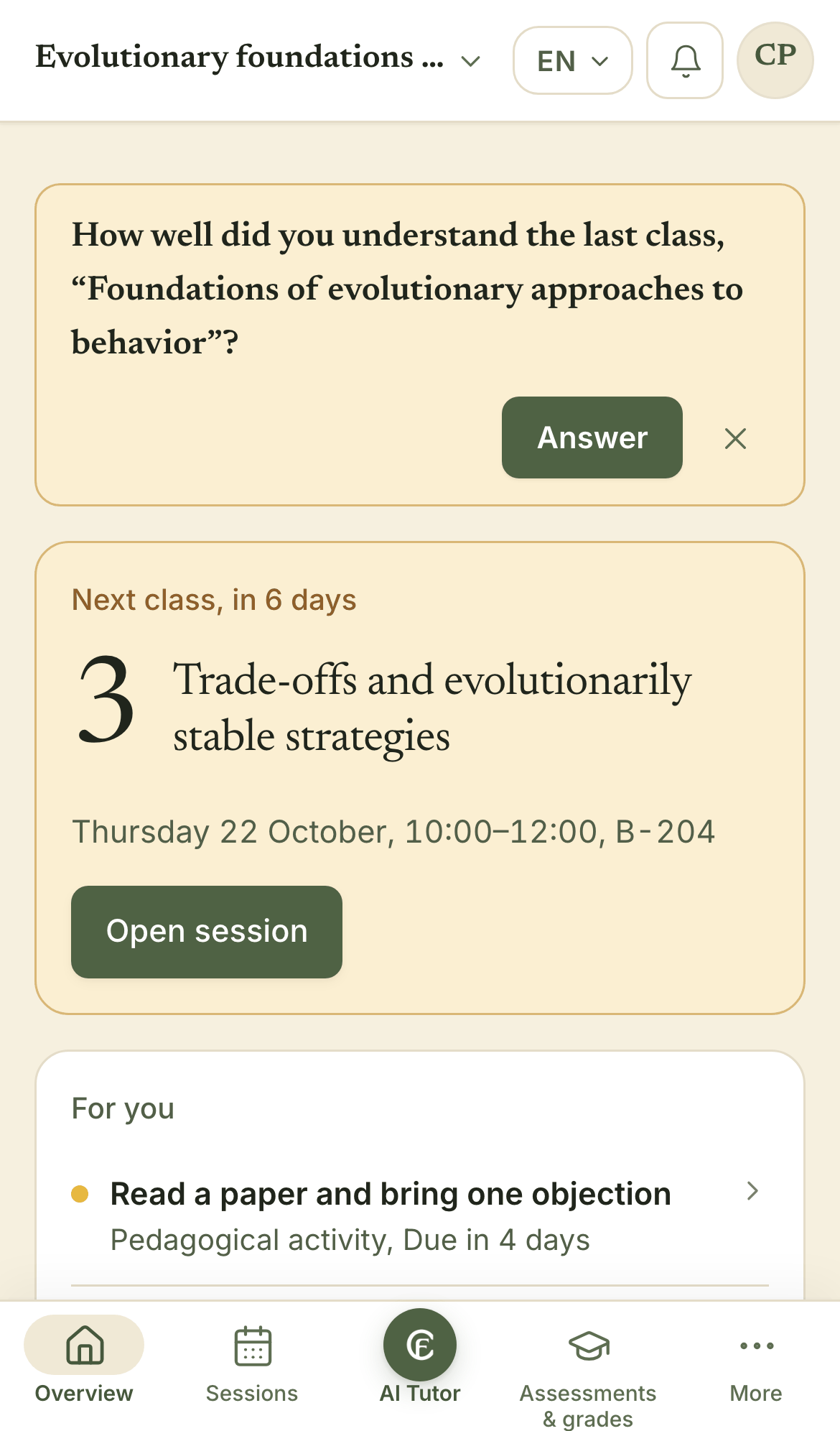
Mobile course home page showing the previous class, the next session, upcoming work and navigation tabs for Overview, Sessions, AI Tutor and Assessments and Grades.
Course overview on a phone.

Security and data sovereignty

European hosting, data protection and institutional control.

European hosting and personal data

CampusFrame is hosted on Scaleway’s French cloud infrastructure. By default, no data is transferred outside the European Union. Students’ conversations with the AI tutor remain private unless they choose to share them. Users can export or delete their data. An independent GDPR compliance audit is planned during the pilot phase.

Hosted by European Cloud & AI

Instructors retain control

AI may propose corrections, grades or class reports, but instructors decide whether to approve them. Irreversible actions and material intended for students also require their consent. Instructors can choose whether their courses offer the full AI tutor and its specialised tools, the standard AI tutor in fast mode alone or no AI tutor, within the policies set by their institution and programme.

Answers linked to their sources

When the AI tutor uses course materials, it links its answers to the relevant pages, passages or slides. Students can open these sources directly. Instructors may also require the AI tutor to limit its answers to the course content.

Freedom to choose AI model providers

CampusFrame can work with models from different providers, including Mistral, Anthropic and Scaleway. Institutions are not tied to a single provider and can require that a programme use only models hosted in France.

Contact

Contact CampusFrame.

For questions about the platform or the pilot programme: contact@campusframe.ai